
ST: Red Alert Wallpaper3.5 - Get APK
You'll be able to download in few seconds.
Publisher Description
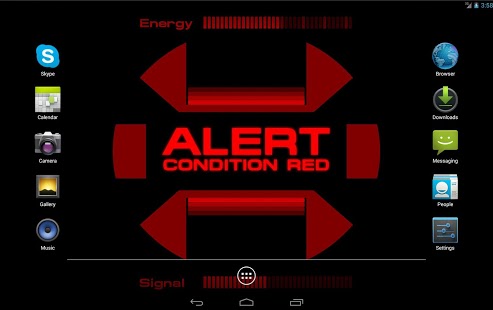
A live wallpaper imitating the Star Trek Red Alert signal. But it's not just some eye candy, true to its original purpose it will help you to monitor your device and alert you about any important events. Missed a call from your friend without noticing? You won't ever again when the Red Alert flashes on your screen and the klaxon calls for your attention ;)
Currently the following events can be set to trigger the yellow or red alert:
- Messages: SMS, MMS, GMail, Skype*, WhatsApp*, Kik*, Viber*, Snapchat*
- Missed Calls: Phone, Skype*, Viber*
- Alarm Clock
- Battery Level and charging state
- Phone Temperature
- Failed Unlock Attempts
- Signal Loss (WiFi or Mobile)
- Voice Commands (experimental)
* Skype, Kik, Viber and WhatsApp support needs Android 4.3 or newer
Check out the free version to get an impression of this wallpaper.
Used Permissions:
"Read Contacts/SMS/Call Logs" permissions are used to switch the alert on new Phone Calls/SMS. Record Audio is used for Voice Commands.
No Networking permissions are requested.
If you found a bug, have a problem or want to send me feedback/suggestions, please write a mail (address is listed below).
Privacy Policy: Any data accessed by this app is only used locally to ensure the desired functionality and never sent or made available to any other party.
This app uses the Device Administrator permission. if you choose to enable the "Failed Unlock Attempts" alert functionality. In that case the permission is solely used to monitor unlock attempts. No data is collected or shared. No data outside the scope of the wallpaper is changed.
About ST: Red Alert Wallpaper
The company that develops ST: Red Alert Wallpaper is OldPlanets. The latest version released by its developer is 3.5.
To install ST: Red Alert Wallpaper on your Android device, just click the green Continue To App button above to start the installation process. The app is listed on our website since 2017-01-29 and was downloaded 0 times. We have already checked if the download link is safe, however for your own protection we recommend that you scan the downloaded app with your antivirus. Your antivirus may detect the ST: Red Alert Wallpaper as malware as malware if the download link to com.oldplanets.redalertwallpaperplus is broken.
How to install ST: Red Alert Wallpaper on your Android device:
- Click on the Continue To App button on our website. This will redirect you to Google Play.
- Once the ST: Red Alert Wallpaper is shown in the Google Play listing of your Android device, you can start its download and installation. Tap on the Install button located below the search bar and to the right of the app icon.
- A pop-up window with the permissions required by ST: Red Alert Wallpaper will be shown. Click on Accept to continue the process.
- ST: Red Alert Wallpaper will be downloaded onto your device, displaying a progress. Once the download completes, the installation will start and you'll get a notification after the installation is finished.
Program Details
System requirements
Download information
Pricing
Version History
version 3.5
posted on 2017-01-29
- Implemented new Android 6.0+ permission model, requesting permissions at runtime when they are needed and allowing to safely revoke them.
- Added support for Snapchat
- Fixed Android 7 crash
- Some minor fixes across the app
version 3.4
posted on 2016-03-11
- Added a new indicator bar: "Network Usage". It will show you when your device is sending/receiving data and how fast.,- Fixed the picture as background feature which was broken on Android 6 (Marshmallow),- Some minor bugfixes
version 1.3
posted on 2011-02-24
Several fixes and updates
Disclaimer
External Download
We do not host ST: Red Alert Wallpaper on our servers. We did not scan it for viruses, adware, spyware or other type of malware. This app is hosted by Galad and passed their terms and conditions to be listed there. We recommend caution when installing it.
The APK Download link for ST: Red Alert Wallpaper is provided to you by apps112.com without any warranties, representations or guarantees of any kind, so access it at your own risk.
If you have questions regarding this particular app contact the publisher directly. For questions about the functionalities of apps112.com contact us.
